How to Automate Recurring Web Searches with AI
If you repeatedly search for the same topic—product releases, regulations, company news, or entertainment dates—a saved daily or weekly watch can turn that routine into a reviewable update. The walkthrough below uses the current Watchlist AI interface and shows both setup and output.
Step 1: Define a clear, bounded question
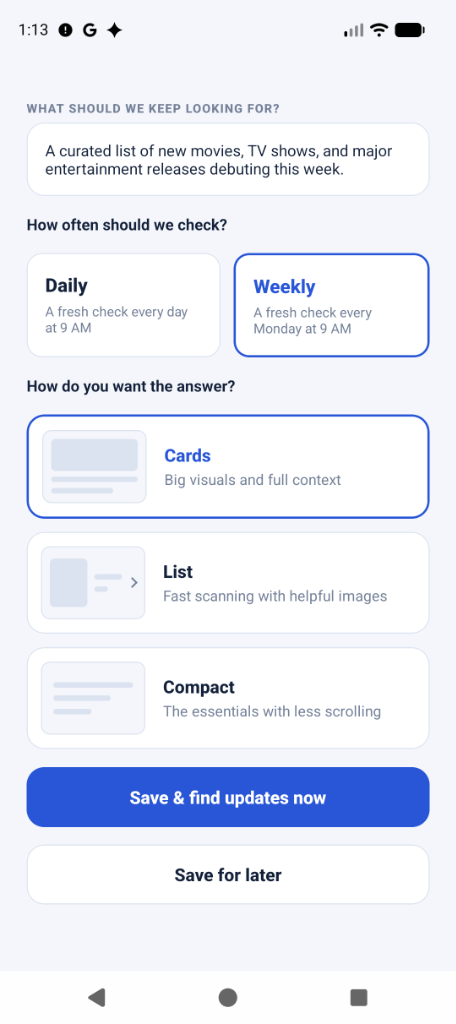
Start with the information you need, the geography or source constraint, and the time window when those details matter. In Watchlist AI, you can describe that task in natural language:
"A curated list of major new developments regarding US solar energy tax incentives and local policy changes."
A narrower description makes it easier to judge whether each future update answers the same task. Avoid vague prompts such as “everything about solar energy.”
Step 2: Choose Your Monitoring Frequency
Not every topic needs real-time alerts. Choosing the right schedule prevents notification fatigue:
- Daily checks: Use when a one-day source window and daily review cadence match the task.
- Weekly checks: Use when a weekly review is enough and you want a wider source window.
Step 3: Review the signal and open its sources
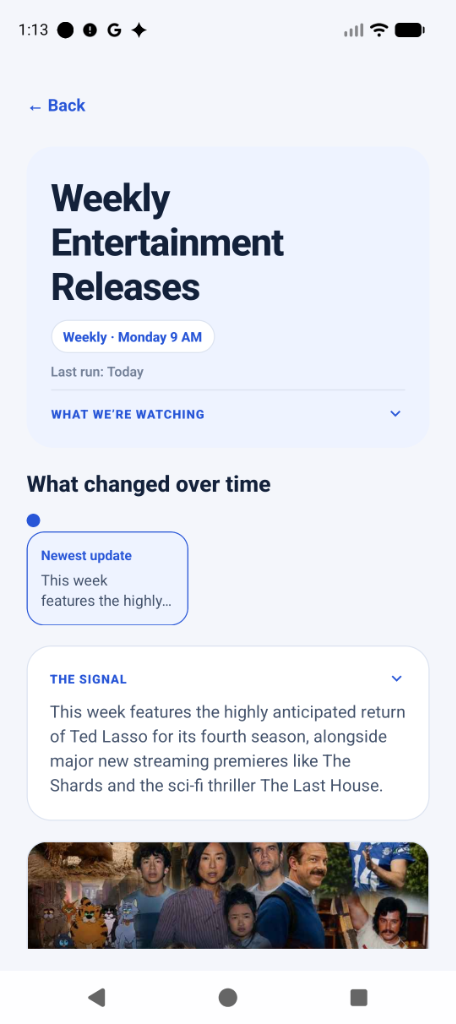
When Watchlist AI runs a saved watch, the product:
- Searches public web sources: the scheduled window is bounded by the watch’s daily or weekly cadence.
- Deduplicates source URLs: repeated canonical sources are removed before synthesis.
- Builds a sourced update: Watchlist AI produces the summary or result cards, and the interface keeps links to the supplied sources.
Reproducible product walkthrough
The screenshots below are first-party captures from the current Android interface, reviewed against the repository on August 30, 2026. They demonstrate the workflow and layout; the entertainment titles shown are sample results, not a promise that the same sources or findings will appear in a future run.

What this workflow does not prove
A source link makes a result auditable; it does not guarantee exhaustive coverage or factual correctness. Open material sources before acting on a high-impact update. For an exact visual or text change on one known URL, use a page-change monitor instead of a topic-search watch.
Try one narrow recurring search
Choose a question you already repeat, set a cadence that matches its freshness, and verify the source links in the first result.
Get Watchlist AI on Google Play